
Litigant Name Search on CaseNet MO
Most people land on CaseNet because they need to find a court case connected to a specific person. The Litigant Name Search tool on courts.mo.gov/casenet is built for exactly that.
You type in a name, the system pulls every court record attached to that name across the entire state.
But knowing how to run the search is only half of it. The bigger question is what shows up once you find a record, who is using this tool beyond the obvious, and what changed after Missouri’s new redaction rules opened up far more case documents to the public.
This page covers the parts that most guides skip.
Important: CaseNet is run by the Missouri Courts at courts.mo.gov/casenet. Our website is an independent resource. We are not a government website and do not collect any personal, court, or payment information from visitors. Always use the official link for actual searches.
What “Litigant” Actually Covers
A litigant is any person or entity named in a court case. That includes plaintiffs, defendants, petitioners, respondents, appellants, and the accused.
It also includes businesses. If a credit card company files a collection lawsuit, that company is the plaintiff. If a contractor gets sued over a job, the contractor is the defendant. Both are litigants.
So when you search a name on CaseNet, the system pulls every record where that name appears as any type of party. Civil, criminal, family, probate, traffic, or municipal. The search does not filter by role unless you tell it to.
People Named in Cases
Plaintiffs, defendants, petitioners, respondents, appellants, accused persons, and witnesses listed as parties.
Businesses & Entities
LLCs, corporations, nonprofits, government agencies, and any organization that appears as a party in a court filing.
Not Limited to Criminal
The search covers civil, criminal, family, domestic, probate, traffic, municipal, and infraction cases unless you filter it.
How to Search by Litigant Name
If you do not have a case number, the litigant name search is the most practical way to find a case on CaseNet. The process takes under a minute once you know where everything sits.
Here is the full walkthrough from start to finish:
Open the Official CaseNet Page
Go to courts.mo.gov/casenet in any browser. This is the only official CaseNet website. Make sure the URL shows courts.mo.gov before entering any information.
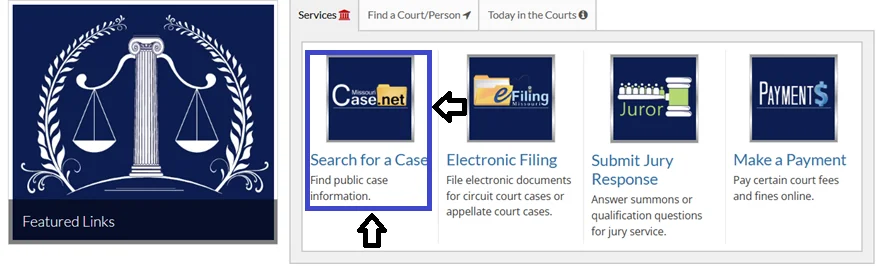
Click Litigant Name Search
On the CaseNet welcome page, you will see several search options in the upper area. Click Litigant Name Search. This opens the form where you enter the party’s name to find matching court records.

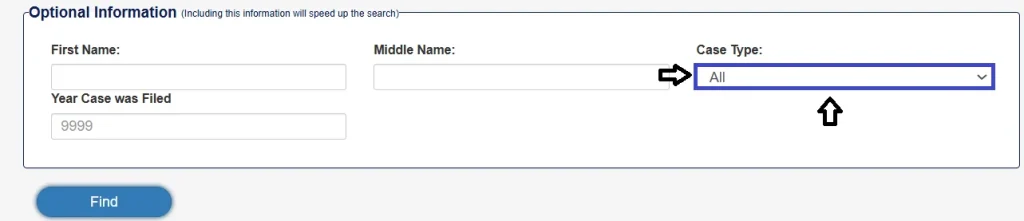
Select the Case Type
Before entering a name, choose which type of case you are looking for. Selecting a specific type keeps the results focused and easier to scan.
- Criminal
- Civil
- Family
- Domestic
- Traffic
- Municipal
- Probate
If you are not sure, you can leave it set to “All” and filter later.
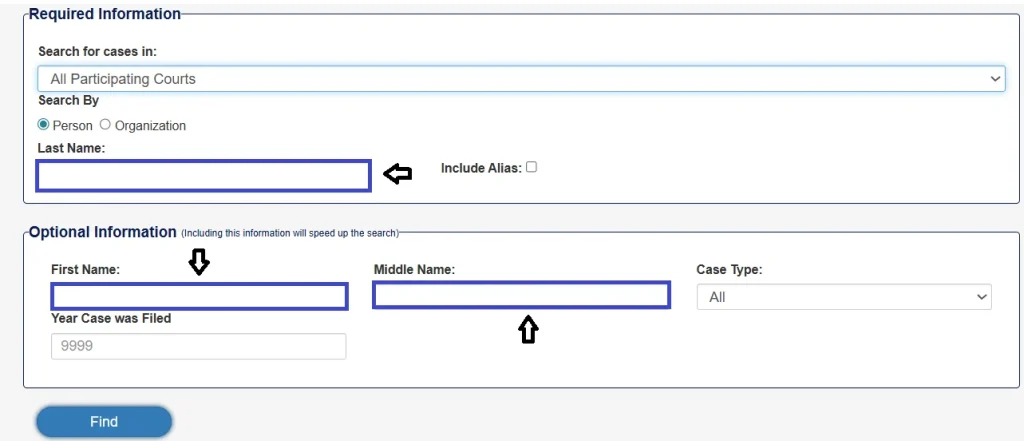
Enter the Person’s Name
Type the last name first, then the first name. If you have a middle name or middle initial, add that too. The more name information you provide, the fewer irrelevant results you will see.
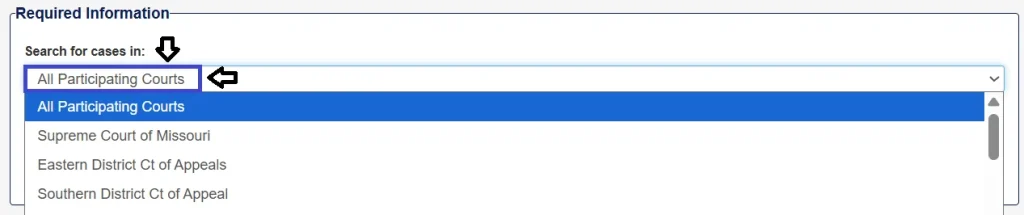
Choose a Jurisdiction or Search Statewide
You can search a single county or circuit if you know where the case was filed. Or you can select All Participating Courts to search every jurisdiction in Missouri at once.
A statewide search is broader but may return many more records, especially for common names. If you already know the county, narrowing the jurisdiction first saves time.
Click Find and Review the Results
Hit the Find button on the lower left of the page. CaseNet will return a list of matching records. Each result shows the case number as a blue clickable link. Click any case number to open the full case file.
If the results are too many, go back and add more details like a middle name, a specific county, or a case type filter.

Why Name Variations Change Your Results
The litigant name search reads what you type literally and matches it against what the clerk or attorney entered into the system. If those two do not match exactly, the case will not show up in your results.
This happens more often than people expect. A filing might list someone as “Michael R. Johnson” while you searched “Michael Robert Johnson.” That single difference between an initial and a full middle name can hide the record.
Common mismatches that cause cases to go missing:
- The court record has only a middle initial, but you typed the full middle name
- The court record has only first and last name, but you added a middle initial that the system cannot match
- The clerk entered a nickname instead of the legal first name (Bill vs William, Bob vs Robert)
- The name includes a suffix like Jr. or III that was entered differently
Because of this, the safest approach is to try multiple versions of the same name:
Last Name + First Name Only
Start with the broadest version. This catches all records regardless of how the middle name was entered.
Add a Middle Initial
If too many results appear, adding a single middle initial usually cuts the list down without being too restrictive.
Full Middle Name
Only use the full middle name if the initial still returns too many matches. This is the most restrictive option and can exclude records entered with just an initial.
Narrow Results When the Name Is Common
A common name searched statewide can return hundreds of records that have nothing to do with the person you are looking for. The system does not distinguish between people who share the same name. It simply shows every matching record.
Each filter you add removes a layer of irrelevant results. Here is what works best:
- Add a middle name or initial. This is the single most effective filter. It can reduce results from hundreds to single digits.
- Select a specific county or circuit. If you know where the case was filed, picking the jurisdiction removes every result from every other county in the state.
- Choose a case type. Selecting Criminal, Civil, Family, or Traffic instead of “All” eliminates every case type you do not need.
- Combine filters together. Using county + case type + middle initial at the same time is the fastest way to get a clean, short result list.
What the Results Page Shows You
After you hit Find, CaseNet displays a list of every matching record. By default the system shows 10 results per page. You can change this using the dropdown above the results on the left side.
10 results
per page (default)
25 results
per page
50 results
per page
100 results
per page
If the name you searched returns many records, the results will be spread across multiple pages. Scroll to the bottom of the page to see the page navigation. You can jump to a specific page number, or use the Previous and Next links to move through the list one page at a time.
Each result row shows the case number as a blue clickable link. Click that link to open the full case file and see all available details.
What You See After Opening a Case File
Once you click a case number from the search results, the full case file opens. The information is organized into tabs across the top of the page. Each tab shows a different set of details.
Case Header
Court location, assigned judge, filing date, case type, current status or disposition, and any fee information connected to the case.
Parties and Attorneys
Names of all parties involved in the case. In many situations this also shows residential addresses and the names of attorneys representing each party.
Docket Entries
A running log of every motion, order, ruling, and filing entered on the case. In some courts, the entries are clickable and open the actual filed document as a PDF. Read more about docket entries.
Charges and Judgments
For criminal cases, this tab shows the specific charges filed, statute references, and the outcome if the case has been resolved.
Hearings & Other Info
Upcoming and past court dates, service information, civil judgments, and garnishment details depending on the case type.
The amount of detail visible varies by court and case type. Circuit court and probate cases generally show more information than municipal court records.
Who Uses This Search and Why
The litigant name search was designed for transparency. But the people using it today go far beyond what the courts originally expected.
Landlords Checking Tenants
Before signing a lease, some property owners search a tenant’s name to see if there are prior evictions, unpaid judgments, or civil suits. Missouri court records list these under civil case filings, and the details are now more visible than they used to be.
Buyers Checking Property Sellers
Real estate attorneys and buyers sometimes run a name search to see if a property seller is involved in active litigation that could affect the title. A pending lien or boundary dispute can complicate a closing, and CaseNet surfaces those cases.
Employers Doing Basic Checks
CaseNet is not a formal background check tool. But some hiring managers still search a candidate’s name to see what comes up. Criminal charges, civil lawsuits, and protective orders can all appear depending on the case type.
Journalists and Researchers
Court records are a primary source for investigative work. A single litigant name search can pull up lawsuits, restraining orders, bankruptcy-related filings, and custody disputes, all tied to one person.
Family Members Tracking a Case
If a relative is involved in a case, whether as a party or an heir in a probate matter, the litigant search helps them find and monitor the file without calling the court clerk every week.
People Checking Themselves
This is more common than most expect. Before applying for a job, renewing a lease, or entering a custody dispute, people search their own name to see what a potential employer, landlord, or opposing attorney might find.
What Missouri’s Redaction Rule Changed for Public Access
Before July 1, 2023, the public could only view basic information on CaseNet. Names of parties, case status, upcoming hearings, and docket entry titles. If you wanted to read the actual filed documents, you had to go to the clerk’s office in person.
That changed under the Missouri Supreme Court’s updated redaction rules. Filed documents are now available online through CaseNet in most circuit court cases. The public can read motions, petitions, discovery responses, and exhibits. The same filings that previously required a trip to the courthouse.
A local news report out of Greene County showed what this means in practice. A credit card company’s lawsuit against an individual, including the exact dollar amount being claimed, was visible online the same day it was filed. A DWI arrest report with specific details about what was found in the vehicle was readable by anyone. A divorce modification listing custody terms was accessible from a phone.
This was always public information under Missouri’s Sunshine Law (Chapter 610 RSMo). The difference now is access. You no longer need to drive to a courthouse during business hours and request a physical file. It is all on your screen.
For litigant name search users, this matters because the search is now the front door to a much larger set of documents. You are not just finding case numbers anymore. You are finding the actual paperwork.
What Personal Details Are Visible After You Open a Case
Once you find a case through the litigant name search and click the case number, the file opens up. One of the tabs inside is Parties and Attorneys.
That tab can show the names of every person involved in the case and, in many situations, their residential addresses. Court records have always listed addresses for parties, but before the redaction rule update, that information was only accessible in person at the clerk’s office. Now it can appear online.
This is useful for genealogy researchers and investigators. It is also a concern for people who did not realize their address was attached to a case they were involved in years ago.
Redaction Falls on the Person Filing, Not the Court
This is the part most people do not know. Under the current rules, the responsibility for removing sensitive information from court filings belongs entirely to the person or attorney submitting the document.
No judge reviews your filing for over-shared details. No court clerk checks whether you accidentally left your bank routing number on page three of an exhibit. If it gets filed, it goes public.
Missouri attorneys interviewed by Springfield-area news stations said the Supreme Court’s guidance to the legal community was to over-redact until the new system settles in. That extra caution adds time and cost. Attorneys bill hourly, and reviewing every document multiple times for compliance adds up.
Your License Is on the Line
If an attorney files a document with exposed personal data, the responsibility and potential consequences fall on them. Most firms now run multiple review passes on every filing before submission.
It Is Entirely Your Job
If you represent yourself, the clerk’s office can check whether a signature is missing or a form is incomplete, but they cannot advise you on what to redact. The courts provide a Confidential Information Filing Sheet to guide you.
Motion to Correct Redaction
If protected information goes public, the affected person has to file a motion to correct redaction. The document gets pulled from public view temporarily, and the court has 30 days to review and fix it.
Why Missouri Gives the Public More Access Than Most States
Missouri’s statewide court system is not normal. Most states still run separate systems in every county. You want a case from Cook County, Illinois? That is one system. Lake County? Another one entirely. Each with its own interface, its own search rules, and sometimes its own fees.
Missouri built a single statewide platform. Every participating circuit, from St. Louis County to the smallest rural court, feeds into the same CaseNet database. One search, one interface, every jurisdiction.
This started in 1994 when the Missouri legislature authorized court automation. The first case management system went live in 1998. That original system eventually became outdated, and Missouri built a second-generation platform that is still being refined today.
Judges who have worked on the Court Automation Committee say the system is recognized nationally. The National Center for State Courts, which serves as the research arm for all 50 state court systems, has pointed to Missouri as a model for what statewide court technology should look like.
For litigant name search users, this means one search can cover every circuit in the state. You do not need to know which county the case was filed in. You can search all of them at once.
When a Litigant Name Search Comes Back Empty
You searched a name. Nothing came back. That does not always mean the person has no court history. Several things can cause a blank result.
Not All Report to CaseNet
Not every city court feeds its records into the statewide system. Smaller municipalities sometimes run their own software. For those cases, you would need to call the city court directly.
Before the Late 1990s
Cases filed before the late 1990s in many counties were never entered into the electronic system. Those records exist, but only on paper at the circuit clerk’s office. You can request them under the Missouri Sunshine Law.
Removed from Public View
Once a record is expunged under Section 610.140 RSMo, it disappears from public search entirely. Sealed records remain in the system but are hidden from public access.
Different System Entirely
CaseNet only covers Missouri state courts. Federal criminal, civil, and bankruptcy cases are on PACER, which requires a separate login.
Small Differences Matter
A filing might use a middle initial where you typed the full middle name. Or the clerk entered a nickname instead of a legal first name. Small differences can hide a case from your results.
422 Results vs 8 Results: A Real Example
A Missouri attorney demonstrated this on camera using a real CaseNet search. He typed in “Tim Smith” with just criminal cases selected across all jurisdictions. The system came back with 422 matching entries.
That is not useful. You cannot scroll through 422 records looking for the right one.
He went back, typed “Tim Lee Smith” with the middle name added, and the same search returned 8 records. From 422 to 8 with a single extra field.
This is the most practical thing you can learn about the litigant name search. The middle name field is not optional filler. It is the difference between a usable result and a wall of cases that belong to other people.
If you do not know the middle name, try a middle initial. If that does not work, narrow to a specific county. If you know the county and the case type, use both filters at the same time. Each filter you add removes hundreds of irrelevant matches.
Business and Organization Name Searches
Litigant name search is not limited to individuals. You can type in a company name, an LLC, a nonprofit, or any organization that has been named as a party in a Missouri court case.
This is common in civil litigation. Collection agencies, credit card companies, contractors, and landlords regularly appear as plaintiffs. Their business name shows up in the litigant field, and the search returns every case where that entity has filed or been sued.
For someone researching a contractor before hiring them, this can surface past disputes. For someone evaluating a business partner, outstanding judgments or repeated litigation might matter. For attorneys doing due diligence on a corporate transaction, litigant search across all circuits gives a snapshot of the entity’s court activity statewide.
Using Litigant Search Results for Due Diligence
Due diligence is a formal way of saying you are checking whether someone or something has legal issues before you move forward with a deal. CaseNet’s litigant name search is a starting point for that.
Real estate attorneys routinely search sellers, buyers, and property-connected names before closing transactions. Active lawsuits, pending liens, and unresolved judgments attached to a party can delay or kill a sale.
Business acquisition teams use it to see if a target company has pending litigation in Missouri courts. A single large lawsuit can affect the valuation of a deal.
Individuals use it before entering financial agreements. Lending money to a friend or family member who has three outstanding civil judgments on CaseNet may not be the wisest move.
| Due Diligence Use | What to Search | What to Look For |
|---|---|---|
| Property purchase | Seller’s full name | Active lawsuits, liens, boundary disputes |
| Tenant screening | Tenant’s full name | Prior evictions, unpaid judgments |
| Business acquisition | Company name + variations | Pending litigation, judgment history |
| Personal lending | Borrower’s full name | Outstanding civil judgments, garnishments |
| Hiring decisions | Candidate’s full name | Criminal charges, active cases |
CaseNet does not replace a professional due diligence report. But it is free, it covers every participating Missouri court, and it takes less than two minutes. Running a litigant name search before signing anything is a habit that costs nothing and can prevent surprises.
How Crime Victims Use CaseNet to Follow a Case
If you are the victim in a criminal case, the prosecutor’s office is your primary point of contact. They should be keeping you informed about hearings, plea offers, and outcomes.
But that does not always happen on time. CaseNet gives victims a way to follow their case independently.
After finding the case through a litigant name search, you can open the case file and use the Track This Case feature. You enter your email address and optionally a phone number, and the system sends notifications when anything is filed or updated on the docket.
Missouri also offers a separate tracking system called VINELink for monitoring an offender’s custody status. VINELink tracks whether someone is in jail, has been transferred, or has been released. CaseNet tracks the court side. The filings, motions, and hearings.
CaseNet Tracking
Monitors filings, motions, hearing dates, and docket changes. Sends email and text alerts when anything new is entered on the case.
VINELink Tracking
Monitors whether the offender is in jail, has been transferred, or has been released. Available through vinelink.com.
Using both together gives a more complete picture. If you receive a notification from either system and do not understand what it means, the prosecutor’s office or the victim advocate assigned to your case can explain it.
What Attorneys See vs What the Public Sees
The CaseNet interface looks slightly different depending on whether you are logged in as a member of the public or as a registered attorney.
Attorneys have access to e-filing tools, certain restricted document types, and case management features that are not available to public users. Some secure financial documents and sealed motions are visible only to attorneys of record on the case.
Public users see the search tools, case headers, party information, docket entries, hearing schedules, and since the redaction rule update, many of the filed documents. The core search functions, including litigant name search, work the same for everyone.
| Feature | Public Access | Attorney Access |
|---|---|---|
| Litigant Name Search | ✓ | ✓ |
| Case headers, parties, hearings | ✓ | ✓ |
| Docket entries & public documents | ✓ | ✓ |
| Track This Case notifications | ✓ | ✓ |
| E-filing tools | ✕ | ✓ |
| Restricted / sealed documents | ✕ | ✓ (if attorney of record) |
| Secure financial filings | ✕ | ✓ |
If you are not an attorney and want to view a document that is restricted on CaseNet, your option is to contact the circuit clerk’s office in the county where the case was filed and request it under the Sunshine Law. Some documents may still be restricted even through the clerk’s office if they are sealed by court order.
When You Are the Litigant: Protecting Your Own Information
If your name appears in a Missouri court case, your information is likely on CaseNet right now. Anyone who searches your name can see it.
That includes your name, the type of case, the county, the outcome, and depending on the case, your address and details from filed documents.
For most people, this is a traffic ticket or a minor civil matter that does not cause any real concern. But for others, especially those involved in domestic violence situations or custody disputes, having an address visible online is a safety issue.
Missouri does protect certain case types. Protective orders and similar filings under Chapter 455 RSMo do not list the petitioner’s name publicly. But in other case types, including divorces and civil lawsuits, party information is visible by default.
Official Sources
- Official CaseNet Search Page: courts.mo.gov/casenet
- Litigant Name Search Direct Link: courts.mo.gov/casenet/nameSearch
- Missouri Redaction Rules & Confidential Filing Sheet: courts.mo.gov
- Missouri Sunshine Law (Chapter 610 RSMo): revisor.mo.gov
- Missouri Court Automation Information: courts.mo.gov
- VINELink Victim Notification System: vinelink.com
- Missouri Circuit Clerks Directory: courts.mo.gov
- Missouri Attorney General Sunshine Law Resources: ago.mo.gov
- PACER (Federal Court Records): pacer.gov
- Missouri Coalition Against Domestic and Sexual Violence: mocadsv.org
FAQs
Can a landlord use the litigant name search to check a tenant before signing a lease?
Yes. CaseNet is a public system. Any person can search any name without giving a reason. Landlords, employers, and individuals all have the same access. The search is free and does not require registration.
Does the litigant name search show both civil and criminal cases at the same time?
It can. If you leave the case type filter set to “All,” the system returns every type of case attached to that name. You can also select a specific case type such as civil, criminal, family, or traffic to narrow results.
What is the difference between litigant name search and a background check?
CaseNet shows court records. It tells you what has been filed, what is pending, and what has been resolved. A formal background check through MACHS includes arrest records, conviction history, and fingerprint verification that CaseNet does not provide.
Can I search for cases from before 2000 using the litigant name search?
Some older records are in the system, but coverage gets thinner the further back you go. Many cases filed before the late 1990s were never digitized. For those, contact the circuit clerk in the county where the case was filed.
What happens if someone files a document with my personal information exposed?
You or your attorney can file a motion to correct redaction. The court removes the document from public view while it reviews the issue. The review period is 30 days. During that time, the document is not accessible online.
Can I search for a company or LLC name, not just a person?
Yes. The litigant name search works for any party name, including businesses, organizations, LLCs, and government entities. Enter the name as it would appear on a legal filing.
Why does the same person show up with different name formats across multiple cases?
Court records are entered by clerks and attorneys. Some enter a full middle name, others use an initial, and some skip the middle name entirely. That means one person can appear under slightly different name formats in different cases.
Is litigant search available 24 hours a day?
No. CaseNet operates Monday through Friday, 6 a.m. to 1 a.m. Central Time. Outside those hours, the system goes offline for maintenance. Weekend availability can vary.
Can someone see my address through a litigant name search?
In many cases, yes. The Parties and Attorneys tab inside a case file can display the residential address of each party. This information has always been part of the court record, but it is now accessible online rather than only at the clerk’s office.
Is there any cost to use the litigant name search on CaseNet?
No. Searching by litigant name on CaseNet is free. You do not need to create an account or log in to use it. Paid services like MACHS are separate and serve a different purpose.
